Finding the Best Streaming Camera that delivers professional video quality without complicated setup or excessive cost can transform content from amateurish to broadcast-ready instantly. Grainy footage, poor lighting adaptation, and distracting background noise undermine even the most valuable content—yet navigating resolution specifications, sensor sizes, and autofocus technologies creates confusion rather than clarity. This comprehensive guide explores five exceptional streaming cameras engineered to elevate video conferencing, content creation, and live streaming through advanced features that work intelligently without requiring cinematography expertise or constant manual adjustments.
Contents
5. Logitech MX Brio

Ultra HD 4K capability enables meeting or streaming in 4K resolution at 30 frames per second, or alternatively 1080p at smooth 60fps through the most advanced webcam sensor Logitech has engineered to date. The sensor features 70 percent larger pixels compared to previous generations, capturing substantially more light per pixel for dramatically sharper image quality across varying lighting conditions. This pixel size advantage translates into noticeably clearer video that reveals facial expressions and details standard webcams miss entirely, making remote interactions feel more personal and engaging.
AI-enhanced image processing delivers twice the face visibility improvement with finer detail preservation in difficult lighting scenarios through sophisticated algorithms managing auto-exposure, auto white balance, noise reduction, and autofocus simultaneously. These intelligent adjustments happen continuously in real-time, ensuring optimal image quality without requiring manual intervention during meetings or streams. Users struggling with backlighting, dim rooms, or inconsistent ambient light benefit tremendously from technology that automatically compensates for challenging conditions that render lesser webcams nearly unusable.
Creative control reaches professional levels through fine adjustment capabilities allowing precise tuning of lighting parameters including ISO sensitivity, shutter speed, color tint, and vibrance levels. Content creators seeking specific visual aesthetics can dial in exact settings matching their branding or artistic vision, while those preferring simplicity can enable Auto mode handling everything automatically. Integrated dual beamforming noise-reducing microphones minimize background noise through AI assistance, ensuring voices transmit clearly even in environments with keyboards clacking, HVAC systems humming, or household activity occurring nearby.
Practical features enhance collaboration and privacy significantly. Show Mode functionality enables tilting the webcam downward to share notes and sketches on desks, allowing better collaboration during calls when demonstrating physical materials or handwritten content. The built-in privacy cover rotates to completely block the camera lens between meetings, providing mechanical assurance against inadvertent video transmission that software-only solutions cannot match. This physical barrier eliminates paranoia about cameras activating unexpectedly during private moments.
4. Insta360 Link 2
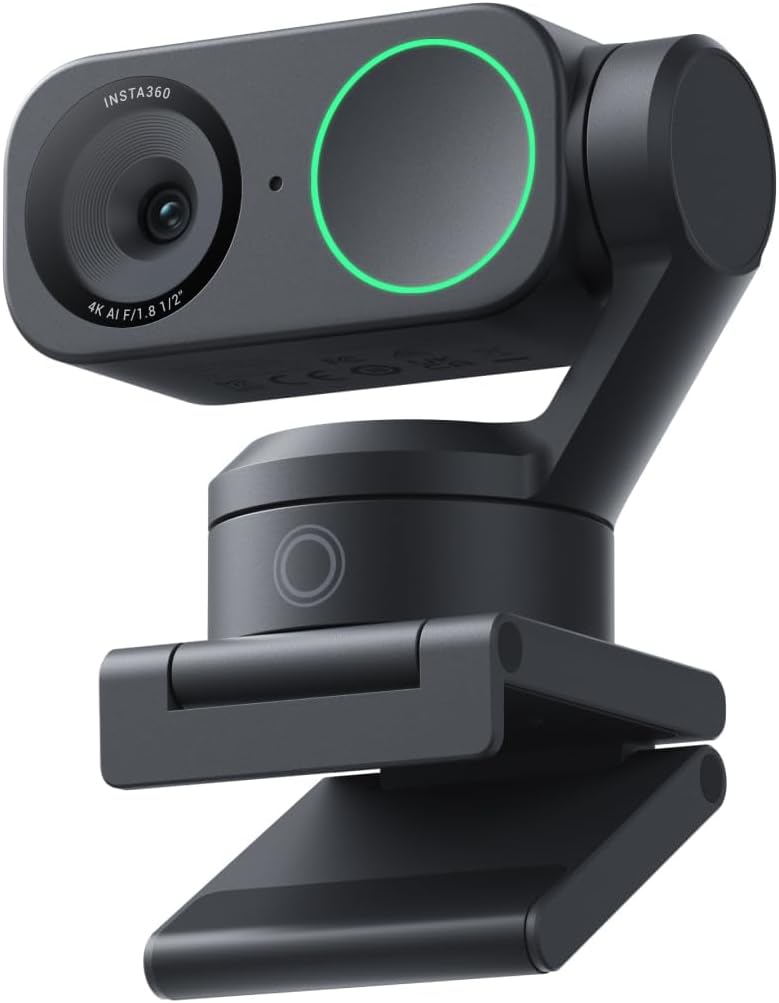
Premium image quality stems from an impressive 1/2-inch sensor capturing balanced, true-to-life 4K visuals with HDR technology delivering exceptional low-light performance for quality videos regardless of lighting conditions. The larger sensor size compared to typical webcams collects substantially more light, reducing noise and grain while preserving detail in both bright highlights and dark shadows simultaneously. This professional-grade imaging capability approaches DSLR camera quality, creating content that stands out dramatically from standard webcam footage in clarity and dynamic range.
Professional audio emerges through best-in-class processing utilizing advanced AI noise-canceling algorithms that filter unwanted background noise for clear communication even in busy environments. The sophisticated sound processing distinguishes voices from ambient sounds, effectively removing keyboard typing, air conditioning, traffic noise, and other distractions that typically contaminate audio tracks. This clean audio quality proves essential for professional presentations, remote teaching, or content creation where viewers demand clarity rivaling studio-recorded productions.
True Focus capability keeps audiences engaged through faster, more accurate Phase Detection Auto Focus eliminating the frustrating blurry moments plaguing traditional contrast-detection autofocus systems. PDAF technology locks focus almost instantaneously when subjects move, maintaining crisp video throughout presentations, demonstrations, or animated discussions. The system also enables natural bokeh effects replicating DSLR-like depth of field that provides professional appearance by softly blurring backgrounds while keeping subjects sharp. This depth effect creates polished, broadcast-quality visuals straight from the included Link Controller software.
AI tracking physically pans and tilts the camera to follow movements around rooms, keeping individuals or groups perfectly framed without manual adjustment. The intelligent tracking maintains composition as subjects move, eliminating the static, rigid framing of fixed cameras. Gesture and remote smartphone control enable webcam operation without touching computers—simple hand gestures activate AI tracking, control zoom levels, or enable Whiteboard Mode, while smartphone apps provide complete remote control from across rooms. Specialized modes including DeskView, Whiteboard, and 4K Portrait adapt to diverse scenarios from product demonstrations to educational presentations.
3. Emeet C950

Innovative privacy protection addresses growing security concerns through physical privacy cover sliding mechanism that blocks immoral and unlawful filming attempts. Aligning the cover to the webcam and pressing firmly for seconds activates protection by sliding right or left, providing mechanical blocking that software solutions cannot replicate. The privacy cover features fashionable design aesthetics coordinating with the overall device appearance, making security measures visually appealing rather than appearing as awkward afterthoughts compromising product design.
The 1080p resolution powered by 2-megapixel sensor provides sharp 30fps video with specialized low-light correction optimizing exposure across varying conditions. Achieving optimal image clarity requires using the webcam in well-lit environments while avoiding backlighting or direct light that creates silhouettes or washed-out appearance. The ideal shooting distance spans 0.5 to 1.2 meters with faces directly facing the camera for best results, while pairing with high-definition monitors ensures viewers experience the full quality potential. Video and image parameters accept adjustments through EMEETLINK software, enabling customization matching specific lighting conditions or aesthetic preferences.
The focused 70-degree viewing angle proves ideal for personal use including online conferences and classes, keeping subjects centered without exposing excessive environmental details about homes or offices. This narrower field of view protects privacy more effectively than ultra-wide cameras that reveal entire rooms, helping maintain professional appearance despite working from personal spaces. The fixed focus design offers more stable image quality through precise focusing that doesn’t hunt or shift like autofocus systems occasionally do, providing consistent clarity throughout extended sessions.
Advanced noise reduction functionality significantly enhances sound quality during live videos and online calls by filtering ambient noise for more natural, clearer audio experiences. Optimal microphone performance requires maintaining 1 to 1.8 meter distances from speakers, operating in quiet environments minimizing background noise, and ensuring the microphone remains unobstructed and reasonably close to sound sources. The microphone specifications spanning 100Hz to 10kHz frequency response at -38dB sensitivity deliver voice-optimized audio reproduction suitable for speech-focused applications.
2. Obsbot 4K Webcam

Professional productivity focus defines the Tiny 2 Lite through streamlined feature selection prioritizing teaching and meeting scenarios while maintaining reasonable pricing without compromising quality. The new version retains essential 4K resolution capabilities with 1/2-inch CMOS sensor while simplifying operation for more professional business shooting applications. This focused approach eliminates rarely-used features like whiteboard mode and voice control that complicate interfaces, creating cleaner user experiences for professionals needing reliable video without learning curves or feature overload.
Versatile tracking modes cater to broader audiences with diverse needs through options including upper body tracking and hand tracking configurations. Beyond standard features, this PTZ camera allows customization of tracking areas plus definition of non-tracking zones, offering unparalleled freedom for personalized tracking behavior. Users can designate specific regions where tracking should focus while excluding areas containing distracting movement, ensuring the camera follows intended subjects rather than randomly shifting to capture irrelevant motion in frame edges.
Customizable preset modes receive significant upgrades through functionality that not only sets multiple preset positions but also customizes separate parameters and AI tracking modes for each position independently. When scenes switch between presets, adjustment time reduces dramatically while ensuring every frame captures at optimal settings configured specifically for that viewing angle or subject distance. This intelligent preset system proves invaluable for multi-camera-angle productions or users who frequently alternate between different shooting scenarios requiring distinct settings.
Dynamic gesture control eliminates cumbersome manual operation through intuitive hand signals the camera recognizes instantly. Simply facing the camera and displaying an open hand gesture locks portrait tracking targets, while pointing upward gestures control zoom functions easily without touching keyboards or mice. Multiple shooting modes support horizontal, portrait, and upside-down orientations with automatic screen adjustment based on physical camera placement without sacrificing image quality. This flexibility enables shooting for any mainstream live broadcast platform and diverse environments without requiring separate cameras or complicated reorientation procedures.
1. Emeet C960

Unmatched clarity emerges through genuine 4K resolution utilizing authentic EMEET SmartCam C960 4K CMOS sensor without false upscaling that plagues competing products claiming 4K specs. This pure 4K quality proves ideal for remote business meetings where capturing every facial detail matters tremendously for reading expressions and maintaining engagement. The ultra-clear visuals create presence making participants feel occupying the same physical space despite geographic separation, dramatically improving communication effectiveness for colleagues, students, or audiences. Note that video resolution defaults to 1080p initially, requiring manual switching to 4K through built-in camera software or compatible applications like PotPlayer or OBS.
PDAF autofocus technology combined with auto light correction ensures clear, stable focusing across various scenarios from business conferences to educational lectures. Phase Detection AutoFocus locks onto subjects almost instantaneously, eliminating the blurry interruptions that plague traditional autofocus systems hunting for proper focus during subject movement. Online meetings proceed smoothly in both over-exposed and low-light settings through automatic light adjustment compensating for challenging conditions. The 73-degree field of view focuses on individuals rather than excessive background details, eliminating the need to painstakingly select or blur conference backgrounds that might appear unprofessional or distracting.
Dual AI noise-canceling microphones empowered with sophisticated noise-suppressing algorithms deliver crisp, natural audio perfect for conference calls and remote teaching where clear communication remains paramount. The built-in microphones enable savoring exceptional audio quality that fosters immersive meeting experiences enhancing overall productivity. Users should designate the EMEET SmartCam C960 4K as the default microphone device for optimal performance, ensuring applications route audio through these superior microphones rather than inferior built-in laptop alternatives.
USB plug-and-play simplicity meets high performance through straightforward connectivity requiring zero driver installations, WiFi connections, Bluetooth pairing, or cloud storage accounts. The default USB-A interface ensures immediate operation regardless of technical expertise levels—simply connect the cable and start using the camera within seconds. The included privacy cover provides security between uses, while flexible mounting options adapt to various setup configurations without compromising privacy. This combination of professional performance with consumer-friendly operation makes advanced features accessible to users across all skill levels.
The Ultimate Guide to Streaming Cameras: Technology, Features, and Selecting Your Perfect Video Solution
Streaming cameras have evolved from basic video conferencing tools into sophisticated capture devices capable of producing broadcast-quality content rivaling professional studio equipment. The explosion in remote work, online education, and content creation has driven remarkable technological advancement in webcam capabilities, making professional-grade video accessible at consumer price points. Understanding resolution specifications, sensor technologies, autofocus systems, and intelligent features enables selection of cameras that elevate video presence from adequate to exceptional. This comprehensive guide explores everything essential for choosing streaming cameras that deliver professional results without requiring cinematography backgrounds or complicated setup procedures.
Understanding Camera Resolution and Frame Rates
4K vs. 1080p Resolution
4K resolution displays 3840 x 2160 pixels—four times the pixel count of 1080p’s 1920 x 1080. This quadrupled detail captures facial expressions, text, and fine details that 1080p misses, creating noticeably sharper, more professional-appearing video. The difference proves particularly apparent on large displays or when viewers watch full-screen rather than in small video chat windows. However, 4K requires substantially more bandwidth, processing power, and storage than 1080p, potentially causing performance issues on older computers or slower internet connections.
Many platforms still limit video streaming to 1080p regardless of camera capabilities, making 4K capture ability partially wasted on these services. However, content creators recording locally benefit from 4K capture providing extra resolution for digital zooming and cropping during editing without quality loss. The future-proofing aspect of 4K capability also ensures cameras remain relevant as streaming platforms and internet speeds improve, supporting higher resolutions universally.
Frame Rate Considerations
Frame rate indicates how many individual images cameras capture per second—30fps represents standard video while 60fps provides smoother motion particularly noticeable during quick movements or gestures. The difference matters most for dynamic content like demonstrations, gaming streams, or energetic presentations where motion blur at 30fps can create less polished appearance. Static talking-head videos benefit minimally from 60fps since minimal motion occurs between frames.
Higher frame rates require proportionally more bandwidth and processing power—60fps 1080p data equals or exceeds 30fps 4K in some codecs. Users with bandwidth limitations or older computers may need to prioritize either higher resolution or higher frame rate rather than maximizing both simultaneously. The optimal balance depends on content type and technical constraints of specific streaming scenarios.
Sensor Technology and Image Quality
Sensor Size Impact
Sensor size dramatically affects image quality through light-gathering capability and depth of field control. Larger sensors like 1/2-inch models collect substantially more light than tiny 1/4-inch sensors common in basic webcams, reducing noise and grain while improving low-light performance. The increased light sensitivity enables clearer images in dimly lit rooms where small sensors produce grainy, noisy footage requiring excessive lighting augmentation.
Larger sensors also enable shallower depth of field creating attractive background blur (bokeh) that draws attention to subjects by softly defocusing distracting backgrounds. This professional aesthetic mimics DSLR and cinema camera appearance, elevating perceived production value substantially compared to fully in-focus footage from small sensors. The trade-off involves increased cost and slightly larger camera size accommodating bigger sensor packages.
HDR and Dynamic Range
High Dynamic Range capture preserves detail in both bright highlights and dark shadows simultaneously, preventing blown-out windows or crushed shadow details that make footage appear amateurish. HDR proves particularly valuable when shooting against windows or in unevenly lit spaces where traditional cameras force choosing between properly exposing subjects or backgrounds. The expanded tonal range creates more natural-looking video that better represents how human eyes perceive scenes.
Implementation quality varies tremendously between cameras claiming HDR capability. True HDR requires sophisticated processing balancing multiple exposure levels seamlessly without creating artificial-looking results or ghosting artifacts. Budget implementations may simply boost contrast rather than genuinely expanding captured dynamic range, producing disappointing results despite marketing claims. User reviews and sample footage provide better assessment of actual HDR effectiveness than specifications alone.
Autofocus Technologies
Contrast Detection vs. Phase Detection
Contrast detection autofocus analyzes image contrast across frames to determine focus, hunting back and forth until contrast maximizes indicating proper focus. This method works adequately for static subjects but struggles during movement, creating the familiar focus hunting that briefly blurs images while the system searches for correct focus. The lag proves particularly frustrating during video calls or streams where focusing delays create unprofessional appearance and distract viewers.
Phase Detection AutoFocus (PDAF) uses dedicated sensor pixels detecting phase differences, enabling nearly instantaneous focus locks without hunting. The technology provides dramatically faster, smoother focus transitions that maintain sharp images through subject movement or camera repositioning. PDAF represents substantial upgrade worth prioritizing for anyone creating dynamic content or moving significantly during streams and calls. The performance difference between contrast and phase detection proves immediately obvious, making PDAF one of the most impactful upgrades in modern streaming cameras.
Fixed Focus Alternatives
Some cameras employ fixed focus tuned for specific distance ranges, eliminating focus system entirely. This approach provides consistently sharp images within designed focus range without hunting or delays, though subjects too close or far appear soft. Fixed focus works perfectly for users sitting consistent distances from cameras in well-defined setups, eliminating an unnecessary complication while reducing cost.
The simplicity proves valuable for users wanting reliable, consistent performance without focus system failures or calibration issues. However, fixed focus lacks flexibility for varying shooting distances or sharing different items at different ranges during streams or calls. The decision between autofocus and fixed focus depends largely on whether shooting scenarios remain consistent or vary significantly between uses.
Audio Quality Considerations
Built-in Microphone Technology
Integrated microphones eliminate external audio equipment needs, simplifying setups while maintaining adequate sound quality for most applications. Modern streaming cameras incorporate noise-canceling algorithms and beamforming technology focusing on voices while rejecting ambient noise from keyboards, air conditioning, and environmental sounds. The AI processing distinguishes speech from background noise remarkably effectively, creating surprisingly clean audio despite challenging acoustic environments.
Dual microphone arrays enable better noise cancellation and directionality compared to single microphones, providing noticeably clearer voice capture particularly in noisy environments. The microphone quality in premium streaming cameras often matches or exceeds that of mid-range external microphones, eliminating the expense and complexity of separate audio equipment for casual content creators and professionals satisfied with very good rather than absolute best audio quality.
When External Audio Makes Sense
Serious content creators, podcasters, and musicians require audio quality beyond built-in camera microphones, justifying external microphone investments. Dedicated microphones capture fuller frequency ranges, provide better noise rejection, and offer professional features like adjustable polar patterns and gain control impossible in tiny integrated microphones. The audio quality difference becomes obvious to experienced listeners, though casual audiences may not notice improvements justifying external equipment expenses.
Using external microphones requires additional cabling, configuration, and potential sync issues if audio routes separately from video. The added complexity and cost make sense only when audio quality directly impacts content value or when professional presentation standards demand optimal capture quality. Most business video calls and casual streaming succeed perfectly well with capable built-in microphones found in quality streaming cameras.
Advanced Features and Automation
AI Tracking and Auto-Framing
Physical pan-tilt-zoom (PTZ) capabilities combined with AI tracking enable cameras following subjects automatically as they move around spaces. The automated tracking maintains professional composition without requiring camera operators, valuable for solo content creators, educators demonstrating physical activities, or presenters who naturally move while speaking. The technology keeps subjects centered and properly framed, eliminating the static, rigid appearance of fixed cameras.
Gesture control enables activating tracking, adjusting zoom, or switching modes through hand signals recognized by AI systems. This hands-free control proves particularly valuable during live streams or presentations when stopping to adjust camera settings would disrupt flow. The gesture recognition works remarkably reliably in quality implementations, though occasional misrecognition can occur in complex backgrounds or unusual lighting conditions.
Preset Positions and Scene Memory
Multiple preset positions enable instantly switching between different framing, zoom levels, or focus points suited for varying content types or shooting scenarios. Each preset can store unique settings for exposure, white balance, and tracking behavior, eliminating manual adjustment when switching between configurations. This sophistication approaches professional broadcast camera capabilities, providing remarkable versatility from single camera installations.
The preset functionality proves invaluable for content creators using different framing for different video segments or educators alternating between lecture delivery and demonstration activities. The instant switching maintains professional production pacing without fumbling through menus or manually repositioning cameras between segments.
Practical Considerations
Field of View Selection
Field of view determines how much of a scene cameras capture—narrow FOV shows just faces and shoulders while wide FOV captures entire rooms. Ultra-wide angles of 90+ degrees work well for group video calls or when subjects move significantly, ensuring everyone remains in frame. Narrower 65-75 degree FOV focuses on individuals or small groups while excluding more background details, providing more intimate framing and potentially better privacy by revealing less of personal spaces.
The optimal FOV depends on typical shooting scenarios and environment size. Small spaces benefit from wider angles capturing more scene despite proximity limitations, while spacious areas with controlled backgrounds can use narrower FOV creating more professional close-up framing. Some cameras offer digitally adjustable FOV, providing flexibility without committing to single viewing angle.
Privacy Features
Physical privacy shutters provide mechanical lens blocking that software switches cannot replicate. The physical barrier provides absolute assurance against inadvertent camera activation during private moments, addressing the legitimate security concerns about always-connected webcams. Quality privacy shutters integrate seamlessly into camera designs rather than appearing as awkward aftermarket additions, sliding smoothly without requiring removal or creating openings for dust and debris.
The privacy consideration has grown substantially important as webcam hacking stories proliferate and work-from-home blurs boundaries between professional and personal spaces. Cameras lacking integrated privacy controls can use external stick-on covers, though integrated solutions generally provide superior aesthetics and reliability.
Making Your Optimal Selection
Use Case Priorities
Primary usage determines which features provide most value. Business professionals joining video calls benefit most from reliable autofocus, good low-light performance, and quality built-in microphones, while AI tracking and 60fps prove less critical. Content creators and streamers require higher resolution, better customization options, and potentially external microphone compatibility. Educators demonstrating physical activities value AI tracking and preset positions enabling camera following movement while automatically switching between lecture and demonstration framing.
Budget constraints should focus spending on features directly supporting primary use rather than pursuing comprehensive capability lists including rarely-used features. A camera excelling at specific needed functions outperforms expensive models whose advanced features never get utilized in actual applications.
Platform Compatibility
Verifying compatibility with primary streaming platforms, video conferencing apps, and recording software prevents frustrating incompatibility discoveries after purchase. Most modern streaming cameras work universally through standard USB video device protocols, though some advanced features require proprietary software potentially incompatible with certain platforms or operating systems. Reading detailed compatibility information and user reviews from people using cameras with specific applications prevents unpleasant surprises.
Some cameras optimize for particular platforms through explicit partnerships or feature integration, offering easier setup or exclusive features when used with supported services. These optimizations can provide valuable convenience if primary platform usage aligns with camera specialization, though may limit flexibility for users frequently switching between different services.
The ideal streaming camera balances resolution, sensor quality, intelligent features, and price into solutions that elevate video presence dramatically without introducing complexity or reliability concerns that distract from content creation. Whether pursuing professional business appearance during video calls, building audience through streaming, or teaching remotely, understanding how camera technologies impact viewer experience enables confident decisions. This investment in quality video capture delivers returns through improved communication effectiveness, enhanced professional credibility, and elevated content production values that distinguish creators in increasingly crowded digital spaces.