Searching for the Best Wireless Gaming Keyboard that combines lightning-fast responsiveness with cable-free convenience for your gaming setup? We understand the challenge of finding premium wireless keyboards that perfectly balance performance with reliable connectivity for competitive gaming. Our comprehensive guide showcases top-rated wireless options that deliver crisp keystrokes, impressive battery life, and customizable features while eliminating the clutter of traditional wired setups without requiring technical expertise. Tired of wireless keyboards that suffer from input lag, require constant recharging, or feel mushy compared to their wired counterparts? Our expert recommendations feature only the finest wireless gaming keyboards that maintain their performance through years of intense gaming sessions. Ready to upgrade your battlestation with the freedom and precision it deserves? Let’s explore these exceptional options that blend competitive-grade responsiveness with real-world wireless convenience.
Contents
5. Redragon K707 Pro
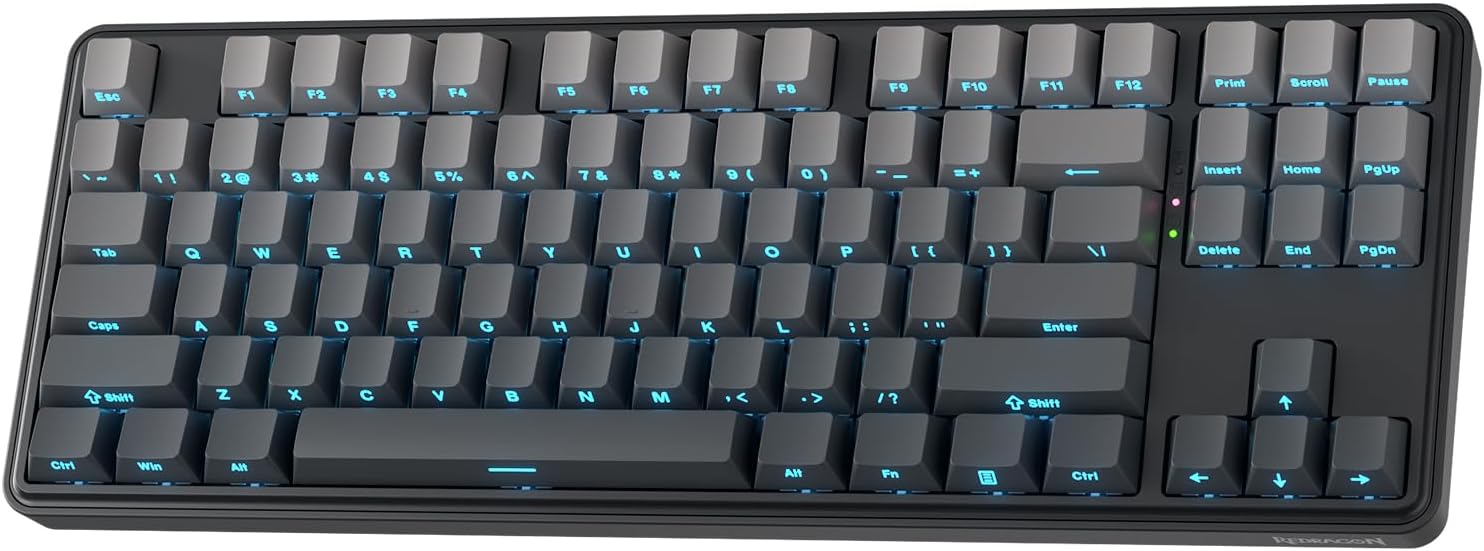
Looking to experience the perfect blend of performance, acoustics, and premium build quality without the premium price tag? The Redragon K707 PRO Mint Mambo brings a refreshing approach to mechanical keyboard design that immediately distinguishes it from budget competitors. The innovative gasket-mounted construction represents a significant departure from traditional screw-fixed structures that create rigid, hollow-sounding typing experiences. Instead, Redragon employs precision-locked covers supported by flexible gaskets that allow the entire typing surface to float slightly within the frame. This engineering approach results in noticeably softer, more flexible key feedback that absorbs impact energy rather than transmitting it harshly to your fingertips. Each keystroke delivers a crisp yet cushioned feel that reduces fatigue during marathon gaming sessions while simultaneously minimizing the case resonance that creates annoying hollow sounds in cheaper keyboards.
Connectivity versatility separates this keyboard from single-connection alternatives that limit your setup flexibility. Redragon’s comprehensive tri-mode system seamlessly integrates USB-C wired, Bluetooth 3.0/5.0, and 2.4GHz wireless connectivity into one unified device. This flexibility means you can connect to your gaming PC via low-latency 2.4GHz wireless for competitive matches, switch to Bluetooth for your work laptop during the day, then plug in via USB-C when you need guaranteed zero-latency performance or simply want to keep the keyboard charged during extended sessions. The connection stability remains solid across all three modes, eliminating the frustrating dropouts and lag spikes that plague inferior wireless implementations. Whether you’re gaming, working, or multitasking across your entire setup, the K707 PRO adapts instantly to your needs.
The acoustic engineering deserves special attention for anyone who values a refined typing experience. Inside the keyboard’s chassis, Redragon has integrated five distinct layers of noise-dampening materials working in harmony to eliminate unwanted sounds. PO foam serves as the primary sound absorber, while IXPE switch foam specifically targets the hollow pinging that occurs within individual key housings. A PET sound pad adds another layer of acoustic isolation, supplemented by additional socket foam that prevents PCB vibration. Finally, a dense silicone bottom pad absorbs residual case resonance that would otherwise transmit to your desk surface. This comprehensive dampening system, paired with the flexible silicone gasket mounting, produces a remarkably clean, muted sound profile that transforms typing from a cacophony of plastic rattling into smooth, satisfying acoustic feedback. The difference becomes particularly apparent in quiet environments or during late-night gaming when every keystroke would otherwise disturb household members.
The custom Mint Mambo linear switches represent another thoughtful upgrade that enhances the typing experience immediately upon unboxing. These proprietary switches arrive pre-lubricated from the factory, delivering a creamy, consistent feel that eliminates the scratchy sensation commonly associated with unlubed switches. The smooth travel from actuation through bottom-out creates satisfying feedback without the harshness that causes finger fatigue during extended use. Beyond their excellent out-of-box performance, these switches maintain full compatibility with both 3-pin and 5-pin switch designs, opening extensive customization possibilities for enthusiasts who enjoy experimenting with different switch types. Whether you eventually want to try tactile bumps, clicky feedback, or alternative linear weights, the hot-swappable socket design welcomes your modifications without soldering or technical expertise.
The compact 80 percent TKL (tenkeyless) layout strikes an ideal balance between functionality and desk space efficiency. By eliminating the rarely-used number pad while retaining arrow keys and essential navigation functions, this form factor maximizes mouse movement area for low-sensitivity FPS players while maintaining the dedicated keys that matter for productivity and general computing. The gradient PBT keycaps add visual flair while delivering superior durability compared to cheaper ABS plastic alternatives that develop shine and wear patterns after months of use. The south-facing RGB lighting implementation ensures the LEDs shine through keycap legends clearly without creating distracting glare, while the per-key addressability enables complex lighting effects and game-specific profiles. The K707 PRO delivers both style and functionality in a compact, great-sounding package that punches well above its accessible price point, making premium mechanical keyboard features available to budget-conscious gamers who refuse to compromise on quality.
4. Logitech G515

Seeking a sleek, modern gaming keyboard that delivers professional performance without dominating your desk space? The Logitech G515 LIGHTSPEED TKL mechanical gaming keyboard embodies contemporary design philosophy that prioritizes both aesthetics and functionality. The remarkably slim profile immediately distinguishes this keyboard from chunky traditional gaming boards that create cluttered, aggressive-looking setups. The low-profile construction reduces overall height significantly, creating a cleaner visual flow across your desk while simultaneously improving ergonomics by reducing the wrist angle required for comfortable typing. The tenkeyless form factor eliminates the number pad that most gamers rarely use, freeing substantial desk real estate for expansive mouse movements crucial for low-sensitivity aiming in competitive shooters. Despite the compact footprint, you retain all essential keys including dedicated function row, arrow cluster, and navigation block that disappeared from even smaller 60 percent layouts.
The tri-mode connectivity system demonstrates Logitech’s commitment to versatility without compromising their legendary performance standards. LIGHTSPEED wireless technology delivers the same 1ms response time as wired connections, eliminating the input lag that historically plagued wireless gaming peripherals. For devices lacking LIGHTSPEED receiver support, Bluetooth connectivity provides universal compatibility with laptops, tablets, and even smartphones. The wired USB-C option ensures you never face downtime from depleted batteries during crucial moments, while simultaneously keeping the keyboard charged for your next wireless session. Switching between devices or connection modes happens instantly using dedicated hotkeys, eliminating the frustrating multi-button combinations that make mode switching impractical on competing keyboards. This seamless transitions proves invaluable when juggling gaming PC, work laptop, and personal devices throughout your day.
The low-profile GL mechanical switches represent years of Logitech’s switch development expertise applied to slim form factors. These proprietary switches arrive factory-lubricated to deliver smoother, more responsive action compared to scratchy stock switches that require aftermarket modification. The reduced travel distance inherent to low-profile designs enables faster actuation and reset, potentially providing competitive advantages in games where milliseconds determine outcomes. Whether you prefer tactile feedback that confirms each keystroke or linear, fast-actuating presses for rapid-fire inputs, both switch options deliver precise, comfortable performance that maintains consistency through marathon gaming sessions. The shorter throw also reduces finger fatigue by minimizing the distance your fingers travel with each keystroke—a subtle but meaningful benefit during extended play.
Battery performance directly impacts wireless keyboard practicality, and the G515 excels with up to 36 hours of continuous wireless operation. This impressive runtime means you can game through entire weekends without recharging interruptions, while typical daily use extends to weeks between charges. The efficient power management never compromises performance—full LIGHTSPEED responsiveness remains constant regardless of battery level, unlike budget alternatives that throttle polling rates to extend runtime artificially.
Customization reaches new depths through KEYCONTROL technology that transforms every key into a programmable control surface. Beyond simple macro recording, this system allows layering multiple functions per key, creating sophisticated command centers tailored precisely to your playstyle. MMO players can consolidate entire action bars onto accessible home row keys, while content creators can bind complex editing shortcuts to single keystrokes. The double-shot PBT keycaps add durability and premium tactile feedback that cheaper ABS plastic cannot match. The legends resist fading through years of use, while the textured surface resists the shine and oil buildup that makes worn ABS keycaps look cheap and feel slippery after months of gaming.
For visual customization, LIGHTSYNC RGB provides access to 16.8 million colors through Logitech’s comprehensive G HUB software. Create lighting themes that match your setup aesthetics, program game-specific profiles that highlight important keybinds, or sync lighting effects across your entire ecosystem of Logitech G peripherals for unified visual presentation. The software’s game integration features can even react to in-game events, flashing colors when health drops low or ammunition depletes. Overall, the G515 LIGHTSPEED TKL delivers genuine competitive performance, sophisticated aesthetics, and extensive customization in a compact, stylish package perfect for gamers who demand speed, versatility, and a polished desk setup that looks as good as it performs.
3. ASUS ROG Strix Scope II

Ready to experience the ideal compromise between compact efficiency and full-size functionality? The latest ROG keyboard delivers an impressive blend that makes it a standout choice for gamers, creators, and everyday users who refuse to sacrifice capability for desk space savings. The clever 96 percent layout measures just 1 centimeter wider than typical 80 percent TKL keyboards, yet somehow manages to incorporate a complete number pad that disappeared from smaller form factors. This spatial efficiency proves invaluable for users who regularly input numerical data for spreadsheets, accounting software, or game console commands, yet still want generous mouse movement area for competitive gaming. The compressed key spacing maintains full-size key dimensions while eliminating the gaps between key clusters that waste space on traditional full-size boards, creating a remarkably tight footprint that maximizes desk real estate.
Connectivity represents another major highlight that elevates this keyboard beyond single-purpose gaming boards. The comprehensive tri-mode support enables seamless switching between Bluetooth for up to three simultaneously paired devices, ultra-low-latency 2.4GHz wireless utilizing ASUS’s proprietary SpeedNova technology, or traditional wired USB connection for guaranteed zero-latency performance. This flexibility transforms one keyboard into your complete peripheral solution—connect to your gaming desktop via 2.4GHz for competitive matches, pair with your work laptop through Bluetooth for productivity sessions, then link to your tablet for content consumption, all without re-pairing or fumbling with connection procedures. The battery life proves truly remarkable, delivering up to 1,500 hours of operation in wireless mode. This exceptional runtime translates to months of typical daily use between charges, making frequent recharging concerns completely irrelevant for normal usage patterns.
The typing experience benefits enormously from integrated acoustic engineering that elevates this keyboard above hollow-sounding competitors. Strategically placed sound-dampening foam absorbs case resonance, while dedicated switch pads isolate each keyswitch from the PCB to eliminate the metallic pinging that creates annoying acoustic artifacts in undampened keyboards. These refinements work synergistically with the pre-lubricated hot-swappable ROG NX switches to deliver remarkably smooth, stable, acoustically tuned keystrokes. The Snow linear variant provides buttery-smooth travel perfect for gaming, while the Storm clicky option delivers satisfying tactile and audible feedback ideal for typing-focused users. The hot-swap socket design welcomes experimentation with alternative switch types without soldering, enabling easy customization as your preferences evolve. Per-key RGB lighting unlocks practically limitless visual customization through ASUS Armoury Crate software, allowing game-specific profiles that highlight important keybinds or aesthetic themes that complement your complete battlestation.
For gaming and content creation workflows, the built-in hotkeys for Xbox Game Bar and recording functions add genuine convenience that streamlines common tasks. Instead of memorizing awkward multi-key combinations or interrupting gameplay to access recording software, dedicated function keys provide instant access to screen capture, gameplay recording, and performance monitoring. The multi-function control wheel provides effortless media playback control and lighting adjustment without requiring software access or dedicated media keys that consume valuable layout space. Comprehensive macro programmability across all keys enables sophisticated automation for both gaming and productivity applications—bind complex ability rotations to single keys in MMOs, create editing shortcuts for video production, or program text expansion macros for repetitive communication.
Ergonomic considerations receive equal attention through three adjustable tilt angles that accommodate different desk heights and personal preference. The included detachable wrist rest provides crucial palm support during marathon gaming sessions, distributing pressure across broader surface area to prevent the fatigue and discomfort that develops from extended keyboard use without support. The magnetic attachment system keeps the wrist rest securely positioned during aggressive gaming without creating permanent bulk for users who prefer minimalist setups. Overall, the ROG Strix Scope II 96 brings exceptional versatility, refined performance, and thoughtful ergonomics together in a remarkably compact package that feels outstanding to use across gaming, creative, and productivity applications. The synthesis of full-size functionality with compact efficiency creates the rare keyboard that truly serves diverse needs without compromise.
2. Redragon K556 Pro

Seeking remarkable versatility and premium performance without the premium price tag that typically accompanies such features? The Redragon K556 PRO brings a surprising level of capability to the mechanical keyboard marketplace that forces reconsideration of what budget-friendly pricing actually means in today’s gaming peripheral landscape. One of the biggest highlights remains the comprehensive 3-mode connection system that integrates USB-C wired, Bluetooth 3.0/5.0, and 2.4GHz wireless connectivity into one unified keyboard. This flexibility proves invaluable whether you’re maintaining zero-latency wired connection for competitive gaming, switching to Bluetooth for casual computing across multiple devices, or embracing 2.4GHz wireless freedom for a cleaner desk setup that eliminates cable clutter. The seamless mode switching feels smooth and effortless through simple keyboard shortcuts, eliminating the frustrating multi-step pairing procedures that plague less sophisticated implementations.
Redragon deserves major recognition for delivering genuine hot-swap support with exceptional compatibility that welcomes nearly any switch on the market. The 99.8 percent-plus switch compatibility claim isn’t marketing exaggeration—the sockets genuinely accept virtually every mechanical switch design without the wobbling or fitment issues that plague inferior hot-swap implementations. This universal acceptance makes experimentation incredibly easy and risk-free, enabling you to discover your perfect switch preference through actual testing rather than gambling on permanent soldered switches based on online descriptions. Tactile switches for typing? Drop them in. Clicky switches for satisfying feedback? Swap them instantly. Heavier linears for deliberate gaming inputs? Install them without tools or technical knowledge. This accessibility democratizes mechanical keyboard customization, removing the expertise barrier that previously limited modification to experienced enthusiasts willing to risk expensive soldering mistakes.
The aluminum construction elevates this keyboard into premium territory that belies its accessible pricing. The metal chassis provides genuine structural rigidity that eliminates the flex and creaking associated with plastic-framed competitors, while simultaneously adding satisfying heft that keeps the keyboard planted firmly during aggressive gaming. The elegant brushed finish adds sophisticated visual appeal that complements modern desk aesthetics far better than the garish plastic gaming aesthetic that dominated previous budget keyboard generations. This premium appearance means the K556 PRO looks at home in professional office environments and mature gaming setups alike, eliminating the need to own separate keyboards for work and play.
The acoustic experience receives careful attention through both switch selection and acoustic dampening implementation. Redragon’s Quiet+ Red linear switches deliver soft, responsive keystrokes with pleasantly muted acoustics that prevent the keyboard from announcing every input to nearby coworkers, family members, or stream audiences. The smooth linear action provides consistent resistance from initial touch through bottom-out, creating predictable feedback perfect for gaming where tactile bumps or clicky resistance might interfere with rapid double-taps or ability canceling. The built-in 3.5mm sound-absorbing foam layer dampens case resonance that creates hollow pinging in undampened keyboards, resulting in refined typing acoustics that sound far more expensive than the keyboard’s actual price would suggest.
RGB lighting implementation delivers both visual impact and practical customization through 20 vibrant preset effects. These pre-programmed lighting patterns span the full spectrum from subtle single-color themes ideal for professional environments, through dynamic wave and ripple effects that add personality to gaming setups, to aggressive reactive modes that respond to your keystrokes in real-time. The on-board brightness and speed controls enable instant adjustments without launching software or interrupting your workflow, providing convenient lighting management without complexity. The south-facing LED orientation ensures bright, even keycap illumination without glare, while maintaining compatibility with Cherry-profile keycaps that sometimes interfere with north-facing implementations.
Overall, the K556 PRO represents a feature-packed keyboard that genuinely delivers high-end characteristics without demanding premium pricing. The combination of tri-mode connectivity, universal hot-swap compatibility, premium aluminum construction, refined acoustics, and comprehensive RGB implementation creates exceptional value for gamers, content creators, and everyday users who want serious capability without breaking budgets. This keyboard proves that thoughtful engineering and smart feature selection can deliver premium experiences at accessible price points, making advanced mechanical keyboard features available to users who previously assumed such capabilities required significantly higher investment.
1. KLIM Chroma Wireless

Looking for exceptional value and genuine convenience without unnecessary complexity or inflated pricing? The KLIM Chroma Wireless Keyboard brings a surprising amount of practical functionality and reliable performance for its remarkably accessible price point, making it an appealing upgrade for anyone seeking a clean, cable-free setup without premium keyboard pricing. One of its biggest strengths lies in the effortless setup experience that eliminates the technical hurdles plaguing many wireless peripherals. Simply connect the included USB receiver to any available port and the keyboard establishes connection instantly—no software installations, no driver hunting, no complicated pairing procedures that require consulting instruction manuals or watching tutorial videos. This plug-and-play simplicity means you’re typing within seconds of opening the package, delivering the immediate gratification that complicated setups deny.
The impressive 30-foot wireless range provides exceptional flexibility for diverse computing scenarios. Game comfortably from your couch while connected to living room gaming PCs, control media playback from across the room during parties or presentations, or simply enjoy the freedom to adjust your seating position without connection dropouts. This extended range proves particularly valuable for home theater PC setups where you want keyboard control without sitting directly at the display, or for office environments where you might present from different locations around conference rooms. The reliable connection maintains responsiveness throughout the entire range, eliminating the frustrating lag spikes or input dropouts that plague inferior wireless implementations with inadequate transmitter power.
The integrated rechargeable battery system addresses one of wireless keyboards’ most annoying ongoing costs while simultaneously providing environmental benefits. Instead of continuously purchasing disposable batteries that drain wallets and fill landfills, you receive long-lasting performance that recharges quickly through standard USB connections. The battery capacity provides weeks of typical usage between charges, while the efficient power management extends runtime without compromising responsiveness or requiring frustrating power-saving modes that introduce input lag. This practical approach saves money continuously throughout the keyboard’s lifespan while proving more reliable than keyboards dependent on finding replacement batteries during inconvenient moments when stores are closed or batteries aren’t immediately available. The convenience factor alone justifies the small premium over disposable battery alternatives, while the environmental responsibility provides additional satisfaction for eco-conscious users.
The RGB backlighting adds genuine personality and visual interest to your workspace through either static illumination or gentle breathing effects that create ambient lighting dynamics. While the lighting system doesn’t offer per-key customization or complex effect programming available on premium gaming keyboards, the implemented effects provide clean, attractive illumination that enhances setup aesthetics without overwhelming simplicity. The bright, even lighting makes keys easily visible in dark environments without requiring desk lamps that create screen glare, proving genuinely functional for late-night gaming sessions or dim office environments. For users preferring minimalist aesthetics or working in bright environments where backlighting proves unnecessary, the lights disable completely rather than forcing permanent illumination that wastes battery power. This flexibility accommodates diverse preferences and usage scenarios without requiring complicated configuration.
Typing comfort receives attention through the short-travel membrane key design that enables faster typing speeds with reduced finger fatigue compared to long-throw alternatives. The keys require less force to actuate and shorter distance to register, reducing the physical effort required for each keystroke. This efficiency becomes particularly noticeable during extended typing sessions where the cumulative energy savings across thousands of keystrokes meaningfully reduces hand and finger fatigue. The familiar membrane feel provides comfortable transition for users accustomed to laptop keyboards or standard office boards, eliminating the adjustment period mechanical switches sometimes require.
Durability considerations include practical spill-resistance that protects against the inevitable accidents occurring around computer workstations. The sealed construction prevents liquid infiltration that would destroy unprotected keyboards, providing crucial protection for anyone who occasionally knocks over drinks during intense gaming moments or late-night study sessions. This practical resilience extends keyboard lifespan significantly compared to vulnerable alternatives that fail catastrophically from single spill incidents, protecting your investment against common household accidents.
Overall, the KLIM Chroma delivers genuine convenience, practical durability, and appealing style without demanding premium pricing or requiring technical expertise. The combination of effortless setup, extended wireless range, rechargeable battery convenience, attractive RGB lighting, comfortable typing experience, and spill-resistant construction creates exceptional value for budget-conscious users who want meaningful wireless keyboard benefits without paying for enthusiast features they won’t utilize. This keyboard proves that accessible pricing doesn’t require sacrificing quality or functionality, making cable-free computing available to users at every budget level.
The Ultimate Guide to Wireless Gaming Keyboards: Freedom, Performance, and Perfect Keystrokes for Your Battlestation
Wireless gaming keyboards have evolved from questionable compromises into legitimate competitive tools that rival or exceed their wired counterparts. Gone are the days when wireless meant accepting input lag, frequent battery replacements, or connection dropouts during crucial gaming moments. Modern wireless gaming keyboards deliver genuine 1ms response times, week-long battery life, and rock-solid connections that eliminate the performance concerns that historically relegated wireless peripherals to casual users. With options ranging from ultra-compact 60 percent layouts to full-size boards with dedicated macro keys, finding the perfect balance between wireless freedom, typing comfort, and competitive performance requires understanding what separates exceptional wireless gaming keyboards from disappointing alternatives. This comprehensive guide explores everything you need to know about wireless gaming keyboards, helping you navigate the options to find the perfect match for your gaming style, desk setup, and connectivity needs.
Understanding Different Types of Wireless Gaming Keyboards
Not all wireless gaming keyboards serve the same purpose or deliver comparable performance. Understanding the distinct characteristics of each type ensures your investment aligns with your actual gaming requirements.
Compact Wireless Gaming Keyboards (60-65 Percent)
Ultra-compact wireless keyboards eliminate number pads, function rows, and sometimes even arrow keys to maximize desk space for expansive mouse movements. These minimalist designs typically measure 60-65 percent of full-size keyboard dimensions, creating remarkably portable packages perfect for LAN parties, travel gaming, or simply maintaining clean desk aesthetics. The reduced key count forces reliance on function layers to access missing keys—holding Fn plus number row accesses F1-F12, for example. This layout proves ideal for FPS gamers who rarely need keys beyond the main alphanumeric cluster, while potentially frustrating MMO players or productivity users who regularly access full key sets. Premium wireless compact boards typically feature high-polling-rate 2.4GHz connections, premium mechanical switches, and week-long battery life despite compact battery compartments. Prices range from $80-200 for quality wireless compact gaming keyboards, with premium models commanding higher prices for features like aluminum construction, hot-swappable switches, and advanced wireless technology.
TKL Wireless Gaming Keyboards (Tenkeyless/80 Percent)
Tenkeyless layouts strike the ideal balance for most gamers by eliminating rarely-used number pads while retaining dedicated arrow keys, function rows, and navigation clusters. This form factor saves approximately 4-5 inches of desk width compared to full-size boards, meaningfully increasing mouse movement area for low-sensitivity FPS players while maintaining the dedicated keys that 60 percent layouts sacrifice. The retained function row provides crucial access to F-keys used for in-game abilities, push-to-talk bindings, and system functions without requiring modifier key combinations. TKL wireless gaming keyboards typically feature slightly larger battery compartments than compact alternatives, translating to extended runtime between charges. The form factor proves universally popular across gaming genres—FPS players appreciate the mouse space, MMO players retain arrow keys for camera control, and productivity users maintain navigation functions for efficient document editing. Quality wireless TKL gaming keyboards range from $100-250, with professional-grade options incorporating tournament-proven wireless technology, premium build materials, and comprehensive customization software.
Full-Size Wireless Gaming Keyboards
Traditional full-size wireless gaming keyboards maintain complete key sets including number pads, appealing to users who regularly input numerical data, prefer dedicated media controls, or want maximum key availability for complex MMO keybinding. The number pad proves invaluable for accounting work, spreadsheet management, or games featuring extensive inventories requiring numerical hotkeys. Some gaming-focused full-size keyboards incorporate dedicated macro columns adding 5-10 programmable keys beyond standard layouts, creating powerful command centers for MMOs, MOBAs, or productivity applications. The larger chassis accommodates bigger batteries enabling month-long runtime between charges, while providing physical space for premium features like OLED displays, dedicated media controls, or USB passthrough ports. However, full-size keyboards consume significant desk space that limits mouse movement for low-sensitivity aiming styles. Quality wireless full-size gaming keyboards typically range from $120-300, with enthusiast models incorporating every premium feature manufacturers can implement.
Essential Benefits of Investing in Wireless Gaming Keyboards
Cable-Free Desk Aesthetics
Wireless keyboards eliminate the visual clutter and physical constraints that cables create across gaming setups. The absence of keyboard cables enables cleaner desk layouts that showcase your setup aesthetics rather than hiding behind cable management solutions. This freedom proves particularly valuable for content creators whose setups appear on camera frequently, or for users who regularly adjust their desk layouts and would prefer avoiding cable disconnection. The wireless flexibility enables easy keyboard repositioning for different tasks—pulling the board closer for intense gaming, pushing it back for relaxed media consumption, or removing it entirely when using drawing tablets or other peripherals that benefit from maximum desk space. Many users report their wireless keyboards encourage better posture by enabling natural arm positioning rather than forcing adaptation to fixed cable lengths.
Multi-Device Connectivity
Modern wireless gaming keyboards typically support connections to multiple devices simultaneously through Bluetooth profiles or paired 2.4GHz receivers. This capability transforms one keyboard into your complete peripheral solution across gaming desktop, work laptop, tablet, and even smartphone. Switch between devices through simple keyboard shortcuts rather than physically moving keyboards between computers or maintaining separate peripherals for each device. This versatility proves invaluable for users who work from home and game on the same desk, content creators who edit across multiple systems, or anyone who simply wants to reduce peripheral clutter. The ability to seamlessly transition from competitive gaming on your desktop to productivity work on your laptop using the same familiar keyboard layout and comfortable key feel cannot be overstated for workflow efficiency.
Portability for LAN Gaming and Travel
Wireless keyboards prove dramatically more portable than wired alternatives for LAN parties, gaming tournaments, or travel. The absence of cables eliminates tangling in bags, accidental disconnection during transport, and compatibility concerns with different USB port layouts on hotel computers or friend’s systems. Premium wireless gaming keyboards often include hard carrying cases that protect the board during transport while organizing accessories like cables, receivers, and keycap pullers. This portability enables maintaining familiar input feel across different gaming environments rather than adapting to unfamiliar peripherals—a meaningful advantage when competing outside your home setup. The travel-friendly nature extends beyond gaming to business trips where you want comfortable typing for work while maintaining the option for evening gaming sessions in hotel rooms.
Critical Factors to Consider Before Purchasing
Wireless Technology and Latency
Wireless technology directly determines whether keyboards meet competitive gaming requirements. Budget wireless keyboards often utilize basic Bluetooth that introduces 10-30ms input lag—imperceptible for typing but potentially problematic for competitive gaming where milliseconds matter. Premium gaming keyboards employ proprietary 2.4GHz wireless protocols achieving genuine 1ms response times identical to high-end wired keyboards. Logitech’s LIGHTSPEED, Razer’s HyperSpeed, and ASUS’s SpeedNova technologies all deliver tournament-proven performance that eliminates wireless disadvantage completely. Verify that keyboards explicitly claim 1ms wireless response times rather than vague “low latency” marketing that might hide inadequate performance. Additionally, consider polling rate—premium wireless gaming keyboards maintain 1000Hz polling even wireless, while budget alternatives might throttle to 125-250Hz, creating perceptible delays during fast movements.
Battery Life and Charging Solutions
Battery specifications directly impact daily usage patterns and long-term convenience. Runtime depends heavily on lighting usage—RGB effects consume significantly more power than minimal backlighting or disabled LEDs. Premium keyboards typically claim 30-40 hours continuous use with RGB enabled, extending to weeks or months with lighting disabled. Consider whether advertised runtime aligns with your usage—if you game 2-3 hours daily with RGB constantly enabled, 40-hour runtime requires charging every two weeks. Charging implementation matters equally—USB-C charging while gaming enables indefinite wireless freedom, while keyboards requiring shutdown during charging create frustrating interruptions. Some premium models support wireless charging pads, eliminating cable connection entirely, though this convenience commands premium pricing.
Switch Type and Typing Experience
Mechanical switch selection fundamentally determines typing feel and gaming performance. Linear switches provide smooth, consistent resistance perfect for gaming where rapid double-taps and smooth presses matter more than tactile feedback. Tactile switches add subtle bumps confirming actuation without audible clicks, balancing gaming performance with typing satisfaction. Clicky switches provide pronounced tactile and audible feedback ideal for typing but potentially distracting during gaming or voice chat. Consider switch weight—lighter springs enable faster actuation but increase accidental keypresses, while heavier springs prevent misclicks but cause finger fatigue during extended sessions. Hot-swappable sockets provide experimentation freedom, enabling switch changes without commitment. Pre-lubed switches feel dramatically smoother than dry stock switches, eliminating scratchy sensations and improving consistency—a premium feature increasingly common on higher-end wireless keyboards.
Layout and Form Factor Considerations
Physical layout determines both ergonomics and functionality for your specific gaming needs. Compact layouts maximize mouse space crucial for low-sensitivity FPS aiming but sacrifice dedicated keys that MMO players or productivity users regularly access. Consider whether you can adapt to function layers for accessing missing keys—this proves natural for some users while frustrating others who prefer dedicated physical keys. Key spacing matters for accuracy—some compact keyboards compress key dimensions slightly to achieve smaller footprints, potentially increasing mistype frequency for users with larger hands. Evaluate whether you regularly use number pads for numerical input, calculator functions, or hotkey-heavy games requiring 10+ easily accessible bindings. The ideal layout balances desk space efficiency with maintaining keys you actually use daily rather than chasing extreme compactness that sacrifices practical functionality.
Maintenance Strategies for Maximum Longevity
Battery Care and Charging Habits
Lithium battery lifespan depends heavily on charging practices and storage conditions. Avoid depleting batteries to zero percent repeatedly—this stresses cells and accelerates permanent capacity loss. Instead, recharge when reaching 15-20 percent remaining, maintaining charge levels between 20-80 percent for optimal longevity. For keyboards with removable batteries, store spares at 40-60 percent charge in cool, dry locations rather than fully charged or depleted. Avoid leaving keyboards plugged in continuously after reaching full charge, as constant trickle charging slowly degrades cell chemistry. If storing keyboards unused for weeks, charge to 50-60 percent first rather than full charge or empty—this neutral state minimizes stress during dormancy. These simple practices often extend battery lifespan by 50-100 percent compared to neglectful usage patterns.
Wireless Receiver Care and Signal Optimization
USB wireless receivers prove surprisingly fragile and easily lost. Many manufacturers sell replacement receivers separately, but compatibility varies—research availability before purchasing keyboards using proprietary protocols. Store receivers in keyboard battery compartments or dedicated storage when transporting keyboards to prevent loss. For optimal wireless performance, position receivers within line of sight of keyboards when possible, avoiding signal blockage by metal desk frames or dense computer cases. USB extension cables enable positioning receivers closer to keyboards on desktops rather than relegating them to rear case USB ports where signal penetration proves difficult. Interference from wireless routers, Bluetooth devices, or even USB 3.0 ports can degrade wireless performance—if experiencing dropouts or lag, try different USB ports or receiver positions to minimize interference.
Switch and Keycap Maintenance
Mechanical switches require periodic cleaning to maintain optimal performance. Compressed air removes dust and debris that accumulates between switches and PCB, preventing the sticky or inconsistent key feel that develops in neglected keyboards. For hot-swappable keyboards, periodically remove switches to clean both switch housing and PCB socket, preventing oxidation that increases electrical resistance. Keycaps benefit from occasional removal and washing with mild soap and water, removing oils and grime that make surfaces slick and unpleasant. PBT keycaps resist shine and degradation better than ABS alternatives, maintaining textured feel through years of use. For keyboards with removable cables, inspect connectors for bent pins or debris that might compromise charging or wired connectivity. These simple maintenance tasks preserve like-new performance through years of intensive use.
Making Your Final Decision
When selecting a wireless gaming keyboard, prioritize honest assessment of your actual gaming needs over impressive specification sheets. Competitive FPS players benefit most from compact TKL layouts with proven low-latency wireless technology, while MMO enthusiasts need full-size layouts with extensive programmable keys. Content creators juggling multiple devices require reliable